
Build the change.
Keep what you learn.
RunWield brings planning, execution, review, and project memory into one coding workflow. Every recorded decision gives the next change a better place to start.
Try RunWieldYour next change starts with what you learned.
Decisions, tradeoffs, and delivery evidence become part of the project’s memory. Future planning can draw on the work you have already done.
Explore detailsHide detailsfor Project learning
Work Records that outlast the chat
Completed Plans leave a durable Work Record: what changed, why, meaningful deviations, and lessons for future work. Ideator, Planner, and Architect retrieve relevant records when shaping the next change.
Records live in your repository as Markdown. Search previous decisions, read them in the browser, and bring lessons from completed Plans into the next conversation.
Memory grounded in your project
Initialize a repository with /init to build project context, a shared domain language, and durable memories. Mnemoteca recalls project and global knowledge; PRDs and ADRs keep product intent and architectural decisions close to the code.
The learning loop is concrete: capture a lesson, retrieve it when it matters, and use it in the next Plan.
Knowledge you can inspect and keep
Plans and Work Records are plain Markdown you can diff, version, and use with other tools. Find project documents, Plans, Work Records, and conversations from Workspace.
Your conversations remain working context. The lasting knowledge is available in artifacts you can read and maintain.
Agree on the change while it is still easy to change.
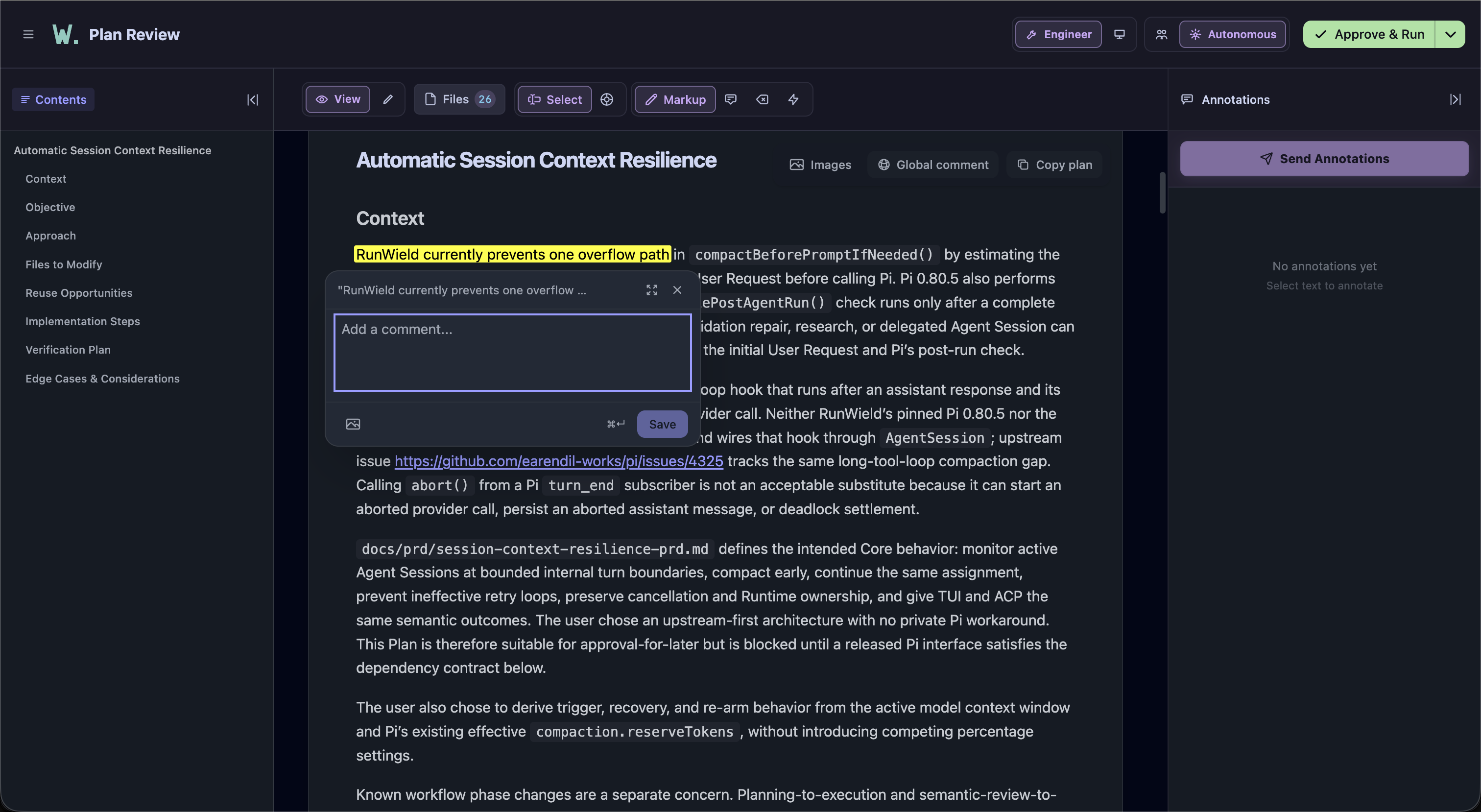
A quick fix stays quick. Bigger work gets a Plan you can question, annotate, and approve before implementation begins.
Explore detailsHide detailsfor Planning and collaboration
The right workflow for the request
Router distinguishes questions, ideation, operations, quick fixes, planned changes, and large Projects. Specialist Agents take over with the context intact, so follow-ups stay with the work.
Use Guide to understand a codebase, Ideator to shape a problem, Planner for a bounded change, or Architect for an Epic. Start with a specific Agent whenever you already know what you need.
A Plan you can work on together
Review in the browser, leave precise annotations, discuss revisions, and choose whether to approve and run or save for later. Reopen the latest review from the conversation with /plan-review.
Discuss larger efforts with Architect right inside the Plan review. Share a Plan with other reviewers, collect feedback, and compare revisions. Shared content is encrypted, and your local Plan stays in Markdown.
Large efforts, manageable pieces
Turn a large project into an Epic with Architect, then work with Slicer to break it into manageable Plans with clear dependencies. Review related changes together as a Sequence.
Bring the pieces together on a dedicated Epic branch. RunWield checks and reviews the combined result, turns integration issues into repair work, and leaves you in control of the final merge.
Control that continues into execution
Let the Agent work autonomously or choose Pair mode to discuss progress at checkpoints. Steer the work as it runs, and decide when the implementation is ready for validation.
When a requirement needs to change, a confirmed Plan Deviation records the old requirement, its replacement, and the reason. Execution, review, and the Work Record retain that decision.
Inspect the evidence behind “done.”
Run your project’s checks, get an independent AI review, and inspect the code before delivery. Keep the implementation connected to the Plan you approved.
Explore detailsHide detailsfor Execution and review
Checks and independent AI review
Quick fixes run your project’s checks. Planned changes also get an independent AI review against the Plan, followed by focused checks of any repairs.
A dedicated repair Agent tackles findings with fresh context. RunWield tracks each issue through repair and review, keeping required fixes separate from optional suggestions.
Code review with a repair loop
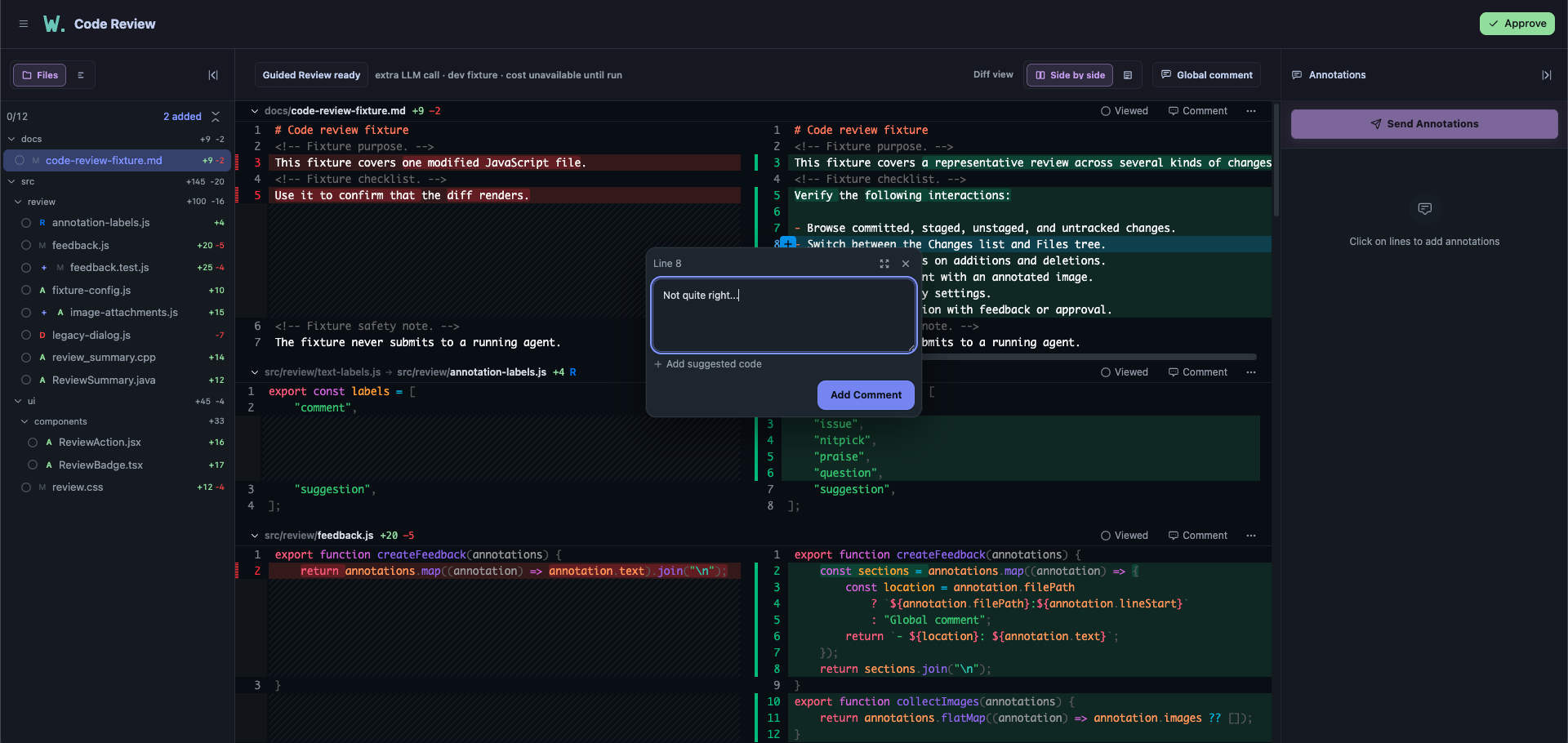
Inspect the complete change, annotate exact lines, and use Guided Review to help navigate a larger diff.
Request changes and the repair Agent handles your feedback, reruns checks, and brings the result back for another review. Continue the conversation until you are ready to approve.
Worktrees, delivery, and recovery
Run planned changes in separate Git worktrees to keep your main checkout clear. Follow implementation, validation, and delivery to your chosen target branch.
Put a Plan on hold, resume it later, or recover an interrupted attempt. Record your own verification with a note when you choose manual acceptance. Archive and restore Plans while keeping their history.
Keep the work moving between screens.
Work in the terminal, continue in the browser, and find the Plans and conversations that need your attention.
Explore detailsHide detailsfor Workspace and Sessions
The same Session, terminal or browser
Start and resume Sessions, choose an Agent, model, and reasoning level, attach images, answer questions, and steer active work from Workspace. Plans stay linked to the conversations that shaped and executed them.
Pair another device to continue the same work remotely, while your project runs on your machine. Pick up a conversation or review a Plan from the screen that is convenient.
A home for what needs you
The Dashboard groups work into Needs You, Ready to Continue, In Progress, and Recently Finished. Plan boards, workflow progress, and linked Sessions take you from the overview to the next action.
Switch Projects, find the context you need, and get browser notifications when work needs your attention.
Long-running work, manageable context
Queue a follow-up or steer the foreground Agent without waiting for the current turn to finish. Background shell tasks and read-only delegates return results to the Session, with logs and cancellation.
See how much context a conversation uses, compact it when needed, and pick up where you left off with saved Session history.
History you can put away and recover
Clear finished conversations from your everyday view without losing their history or linked Plans. Bring an archived Session back from Project settings whenever you need it.
Name Sessions, export them as HTML or JSONL, or explicitly share a conversation as a secret GitHub Gist.
Choose the model. Give it the right context.
Use subscription access or API keys, assign models to specialist Agents, and connect tools that help them understand your project.
Explore detailsHide detailsfor Models and tools
Model choice at the level of the work
Connect supported subscription providers or save an API key. Switch the active model, choose reasoning levels, and use named presets and per-Agent overrides.
Claude Code CLI and Antigravity CLI are also available as execution backends. A separate vision fallback can handle attached images when the conversation model is text-only.
Code intelligence and connected tools
Cymbal helps Agents find code, follow references, and understand the impact of a change. Optional Snip filters keep command output compact so more useful context fits in the conversation.
Connect your tools and data through MCP servers. Agents can use their tools and read resources during the conversation; manage connections with /mcp.
Images inside the workflow
Ask an Agent to create an image for your project, or provide an existing image as a reference. Generated images are saved straight into your project.
Generate images with OpenRouter, Codex, or Antigravity CLI. Choose an image generation backend independently of the model handling your conversation.
Make the harness fit the way you work.
RunWield runs on your machine. Keep your project artifacts, choose your providers, and tailor Agents, skills, prompts, and settings.
Explore detailsHide detailsfor Local setup and customization
Start with a real change
Install the standalone wld binary on macOS or Linux, connect a model, and initialize your repository. An optional onboarding tutorial guides one real Planned Change through the normal workflow.
Skip the tutorial whenever you prefer. Built-in help, update checks, and documentation are there when you need them.
Use RunWield from your IDE or chat
Drive RunWield from JetBrains AI Chat or the Air plugin, or use the OpenAB gateway to work through Discord and its other supported chat platforms. Plan, review, execute, and follow progress from the client you prefer.
RunWield speaks Agent Client Protocol (ACP), so other ACP-compatible clients should work too. You keep RunWield’s planning, validation, and project memory wherever you start the conversation.
Defaults you can make your own
Layer project settings over your home configuration and bundled defaults. Override Agent definitions to fit your project and the way you work.
Skills give Agents reusable ways to tackle a task: let RunWield pick them automatically when relevant, or invoke one explicitly. Connect tools and data through MCP servers, and turn repeatable instructions into prompt templates you can run as slash commands.
Choose a terminal theme, tune context management, set model presets, or hide the mascot. Decide which shell commands Guide and read-only delegates can use.
Ask RunWield to make it yours
RunWield knows how to explain, configure, and customize itself. Tell it what you need, ask how a feature works, or have it help adapt your setup to your workflow.
Try “Help me choose models for my Agents,” “Create a skill for our review process,” or “Explain how Plan approval works.” Start with what you want to accomplish and work through the setup together.
Local state and optional measurement
Plans and Work Records stay in your repository; Session history and credentials stay on your machine. Model requests go to the provider you select. Remote Workspace and Plan sharing are optional connections.
See usage, cost, retries, context, and latency in local workflow metrics. Turn recording on for the Projects you choose; it is off by default.
Where RunWield is headed
Next up: Connect will bring RunWield’s workflow into external coding hosts, starting with Claude Code. We’re also planning reusable software-factory components, broader team workflows, and a metrics dashboard with export. These features are on the roadmap.
Try it on a change
that matters to you.
Bring a real codebase. Start with a question, a quick fix, or a Plan.